Case Study Dental / HealthTech 2026

A Custom Dental Aligner Platform for DAligners

-80%
Manual Work (via Automation)
+5%
Clinic Network Growth
2
Custom Portals (Clinic + Admin)
STL
3D-Scan Case Workflow
Client
DAligners
Industry
Dental / HealthTech
Engagement
WordPress Platform & Custom Portals
Timeline
Completed & Live
Outcome
A complete dental-aligner operations platform — marketing site, clinic portal and admin portal with an STL case workflow and automation — growing the clinic network ~5% and cutting manual effort ~80%.
01
The Challenge

A Dental Aligner Business With No System to Run It

DAligners is a clear-aligner provider: dental practices send patient scans, and the lab turns them into custom aligners. The model worked — the operation behind it did not. Clinic onboarding, case intake, 3D scan files, status updates and clinic communication were all manual, and none of it scaled.

DAligners needed Devvista to build the whole thing: a credible marketing site and two custom portals — one for clinics, one for the lab — that automate the case lifecycle from an STL upload to a finished aligner.

  • 01
    No Clinic Self-Service
    Practices had no way to register, add patients, submit cases, upload STL scans or track status on their own.
  • 02
    Every Case Handled by Hand
    Intake, files, status changes and clinic messaging were all manual — fine for a handful of cases, impossible at scale.
  • 03
    STL Files Everywhere
    3D scan files (upper, lower, bite) arrived by email and various channels with no structured, validated, per-case storage.
  • 04
    No Operational Visibility
    There was no single view of practices, patients, cases by status, or production throughput to run the business on.
02
The Approach

How We Built the DAligners Platform

One custom WordPress theme, two role-based portals, and automation across the whole case lifecycle — from a clinic uploading STL scans to the lab shipping aligners.

01 — MARKETING

Brand Marketing Site

Built the public daligners.com site that presents the clear-aligner brand to patients and dentists, with a clear 'For Doctors' path that funnels new practices into the clinic portal.

02 — CLINIC PORTAL

Clinic Portal with STL Uploads

A self-serve portal where practices register, add patients, create cases and upload the required STL scans (upper, lower, bite) plus photos — then track each case through submitted, under review, in production and completed.

03 — ADMIN PORTAL

Admin Operations Portal

A separate admin portal to approve clinic registrations, manage practices, patients and cases, handle STL files, move cases through the status workflow, and read reports on throughput.

04 — STL WORKFLOW

STL Case-File Management

Structured, per-case storage for 3D scan files and supporting media — mandatory upper/lower/bite STL validation on submission, downloads for the lab, and a full status history on every case.

05 — AUTOMATION

Automated Case Lifecycle

Status transitions, notifications and clinic–lab messaging run automatically end to end — which is what cut the client's manual effort by around 80%. The team manages exceptions, not every step.

06 — WORDPRESS

One Custom WordPress Theme

The entire platform — marketing site and both portals — runs on a single custom WordPress theme with ACF and role-based access, so DAligners owns and manages it without being locked into a SaaS.

Platform Walkthrough

A Look Inside What We Built

Two role-based portals on one custom WordPress theme: clinics submit cases and upload STL scans; the DAligners team runs production from the admin side — with automation moving every case through the workflow.
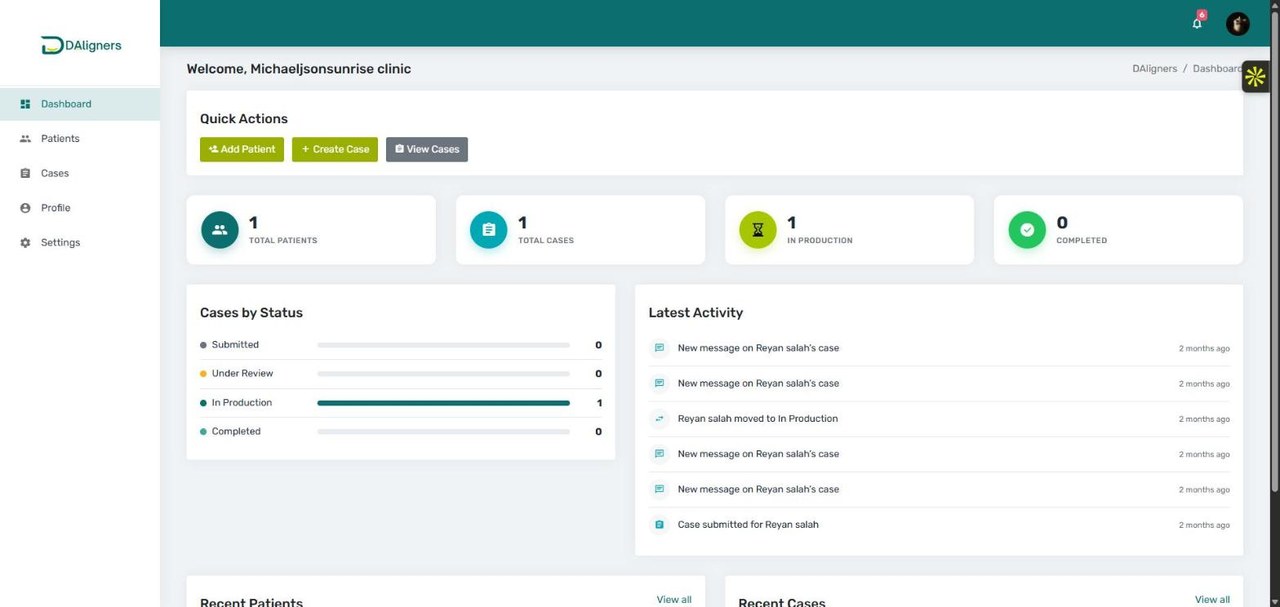
DAligners clinic portal dashboard built by Devvista showing a dental practice's patients and cases by status
Clinic Portal — Dashboard Each practice's patients, cases and live status at a glance.
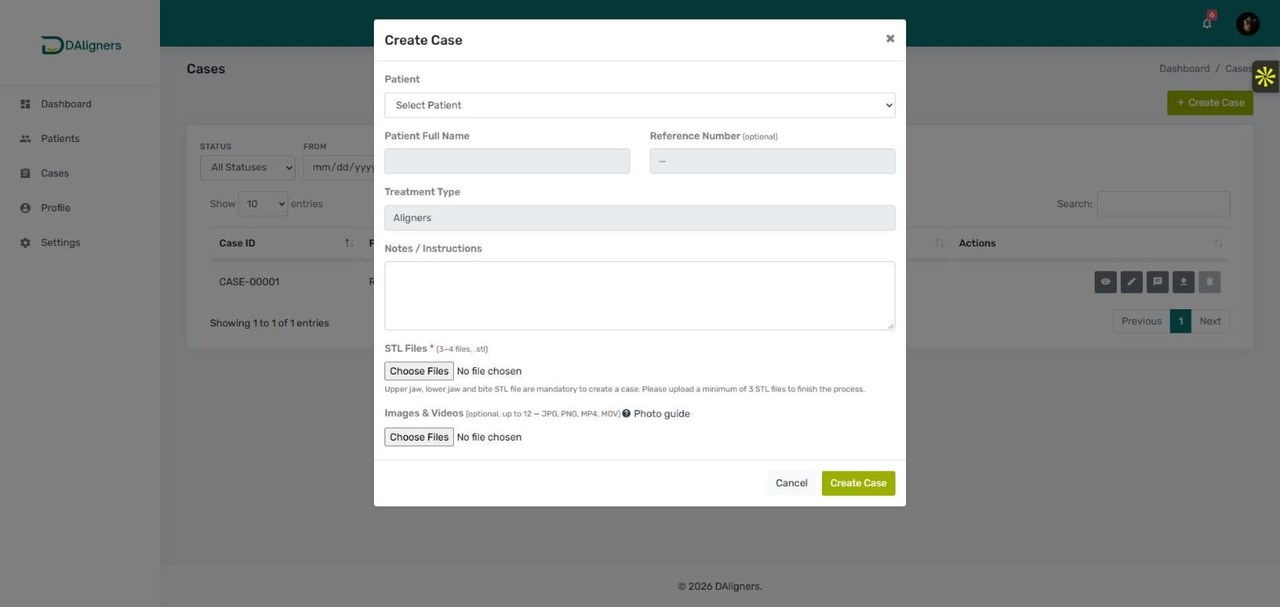
DAligners clinic portal create case form with mandatory STL file upload for dental aligner cases
Clinic Portal — Submit a Case (STL Upload) Clinics create a case and upload the required STL scans — upper jaw, lower jaw and bite — plus photos.
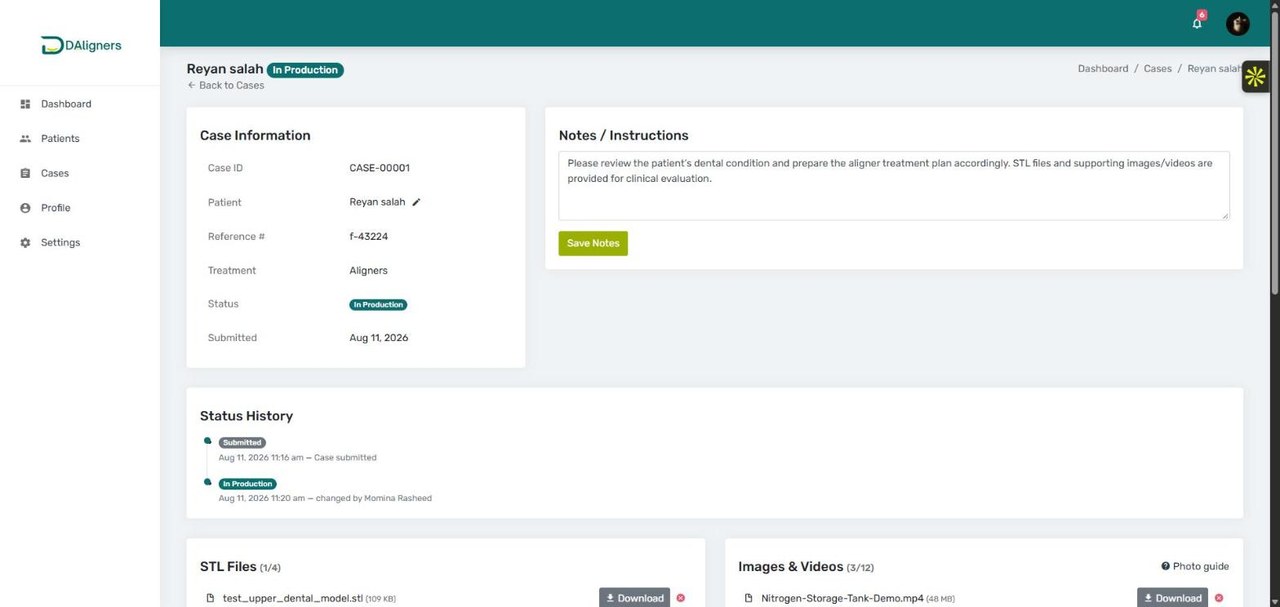
DAligners clinic portal case details page showing STL files, status history and treatment notes
Clinic Portal — Case Tracking Status history, notes, STL files and media for each case, visible to the clinic in real time.
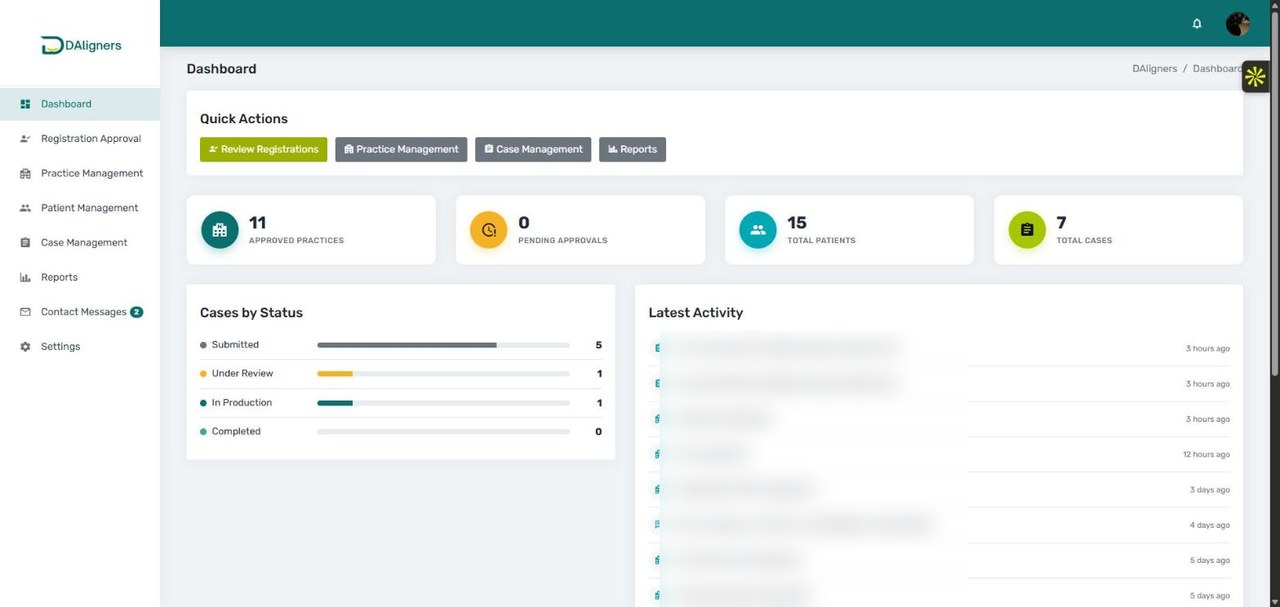
DAligners admin portal dashboard built by Devvista showing approved practices, patients and cases overview
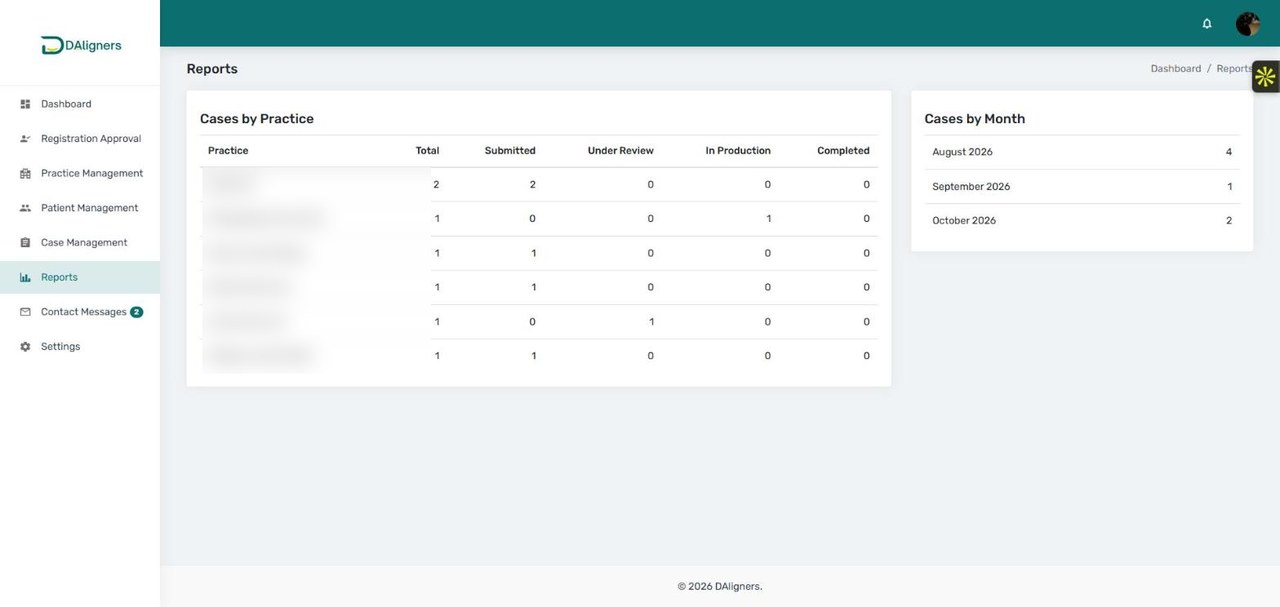
Admin Portal — Dashboard Platform-wide view: approved practices, patients, total cases and cases by status.
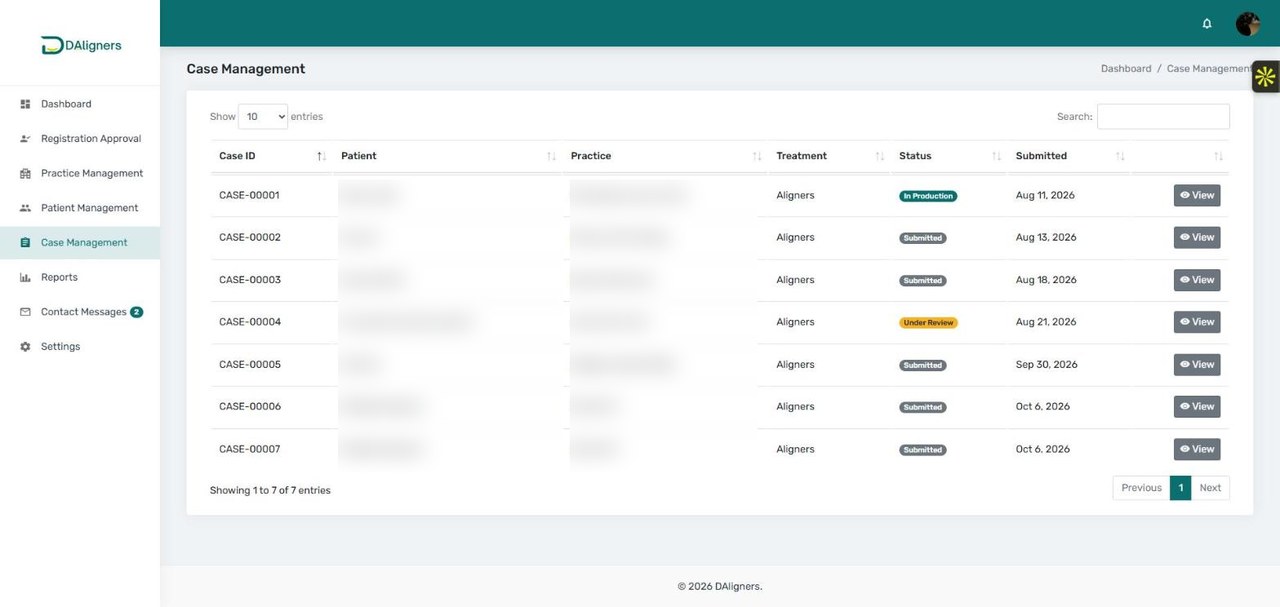
DAligners admin portal case management table showing dental aligner cases across all clinics
Admin Portal — Case Management Every case across every clinic, with status and quick access to details and files.
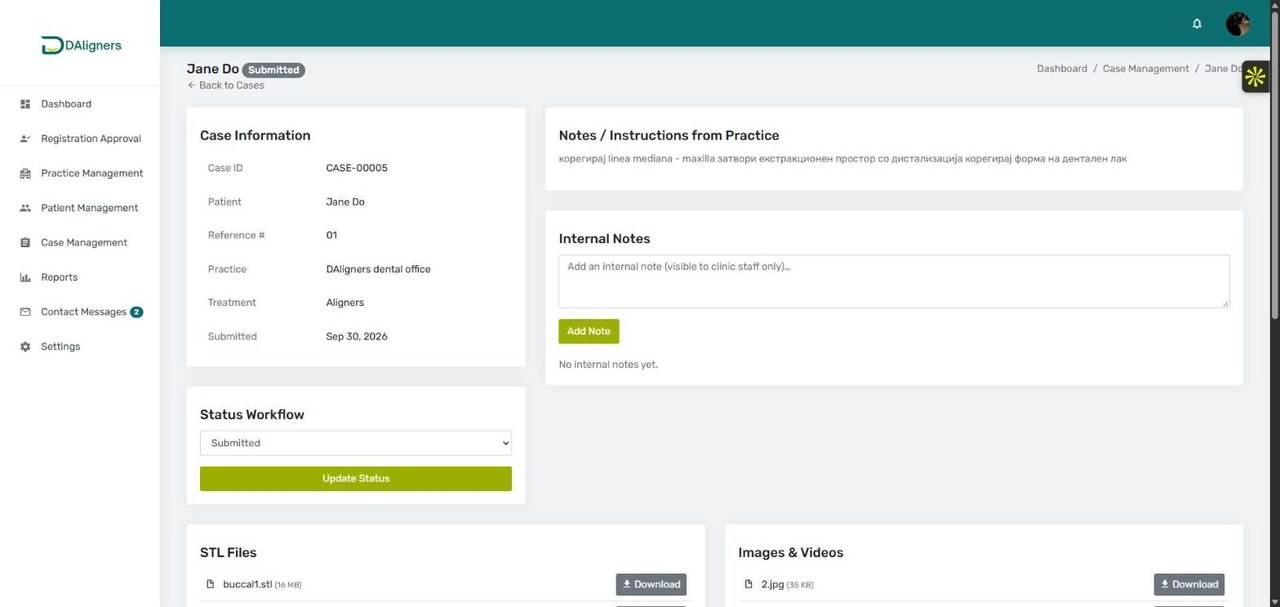
DAligners admin portal case details page with STL file downloads and status workflow for aligner production
Admin Portal — Case & STL Files The lab side of a case: practice notes, status workflow and downloadable STL files.
DAligners admin portal reports page showing cases by practice and by month
Admin Portal — Reports Cases by practice and by month — visibility into throughput and clinic activity.
03
The Results

What the Platform Delivered

A self-serve clinic network, a lab that runs on automation, and a single system of record for every aligner case — on WordPress the client owns.

80 %
Less Manual Effort (automation)
team runs exceptions
5 %
Clinic Network Growth
self-serve onboarding
2
Custom Portals (Clinic + Admin)
3 +
STL Files Per Case (upper/lower/bite)
Case Intake
Manual / email Self-serve clinic portal
STL Files
Scattered Per-case, validated
Status Updates
Manual Automated workflow
The Process

How We Delivered It

Brand site first, then the two portals and the case workflow that ties them together.

01
Discovery & Brand Site
WordPress
02
Clinic Portal + STL Uploads
Custom Theme
03
Admin Portal + Case Workflow
Custom Theme
04
Automation & Notifications
Automation
05
Launch & Handover
Live
Tech Stack

Technologies
& Tools

A single custom WordPress theme powers everything — the marketing site and both role-based portals. ACF models practices, patients and cases; STL and media files are stored per case; and automated status transitions, notifications and clinic–lab messaging drive the workflow.

WordPress Custom Theme ACF Custom Post Types Clinic Portal Admin Portal Role-Based Access STL File Management Status Automation Clinic–Lab Messaging PHP JavaScript / AJAX Bootstrap Nginx SSL / HTTPS
FAQ

Frequently Asked Questions

Common questions about how Devvista built the DAligners WordPress Platform & Custom Portals.

What is DAligners and what did Devvista build?
DAligners is a clear-aligner provider: dental practices send patient scans and DAligners produces custom aligners. Devvista built the company's entire platform on a custom WordPress theme — a marketing site plus two portals: a clinic portal where practices submit cases and upload STL scans, and an admin portal where the team runs production. Automation cut manual effort by around 80% and the clinic network grew about 5%.
How does the DAligners clinic portal work?
It is fully self-serve. A dental practice registers, adds patients, creates a case, uploads the required STL scans (upper jaw, lower jaw and bite) plus optional photos and videos, and then tracks the case through submitted, under review, in production and completed — messaging the lab directly on each case.
How are STL files handled on the platform?
Each case requires a minimum of three STL files — upper jaw, lower jaw and bite — and the clinic portal validates this on submission. Files are stored per case alongside supporting images and videos, remain downloadable for the lab, and every case carries a full status history, so nothing is scattered across email.
What does the admin portal do?
The admin portal is the operational hub: the DAligners team approves clinic registrations, manages practices, patients and cases, handles STL files, moves cases through the status workflow, and reads reports on cases by practice and by month — a single view of the whole business.
How did Devvista cut manual effort by around 80%?
By automating the case lifecycle. Status transitions, notifications and clinic–lab messaging happen automatically, so the team manages exceptions instead of handling every intake, file and status change by hand — which is where the roughly 80% reduction in manual work comes from.
Is the DAligners platform built on WordPress?
Yes. The marketing site and both the clinic and admin portals run on a single custom WordPress theme with Advanced Custom Fields and role-based access. DAligners owns and manages the whole platform, rather than renting a closed SaaS.
How did the platform help grow the clinic network?
Self-serve clinic onboarding and a credible marketing site with a clear 'For Doctors' path made it easy for new dental practices to join and start submitting cases, which contributed to roughly 5% growth in the clinic network.
Can the DAligners team manage the platform themselves?
Yes. Practices, patients, cases, registration approvals and site content are all managed from the portals and the WordPress admin, so the DAligners team runs day-to-day operations without needing a developer.
BUILD

Need a platform with client and admin portals?

We build marketing sites plus role-based portals, file workflows and automation — on tech you own. Book a free call to scope your platform.

Free consultation No commitment required Response within 24 hours